YC Startup School 2026: Complete Guide for Aspiring Startup Founders

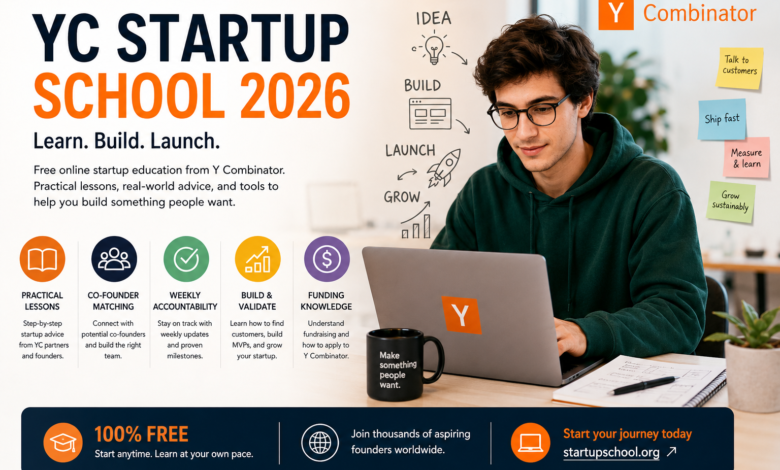
Starting a company can be exciting, but turning an idea into a real startup requires much more than enthusiasm. Founders need to understand customers, develop products, test ideas, attract users, build teams, and eventually determine how to finance and grow the business. This is where YC Startup School 2026 can be particularly valuable for people who want structured guidance while learning how startups are built.
Y Combinator, commonly known as YC, has become one of the world’s best-known startup organizations. Its alumni include companies such as Airbnb, Stripe, Coinbase, DoorDash, Reddit, Dropbox, and many other technology businesses.
Startup School is different from YC’s traditional funded accelerator. It is an online educational program designed to teach people how to start and build companies. The current Startup School platform describes it as a free online course that provides startup advice, accountability tools, and access to co-founder matching.
For anyone searching for YC Startup School 2026, understanding what the program offers, who it is designed for, what founders can learn, and how it fits into the wider Y Combinator ecosystem is important.
What Is YC Startup School?
YC Startup School is an educational program created by Y Combinator to help aspiring founders learn the fundamentals of starting a company.
Unlike the main YC accelerator, Startup School does not require founders to already have a highly developed startup. The current program is designed for people at early stages of building a startup, individuals turning side projects into businesses, and people who are curious about becoming founders.
The program focuses on practical startup knowledge rather than traditional academic business theory.
Participants can learn about areas such as:
- Developing startup ideas
- Building an MVP
- Talking to customers
- Finding users
- Growing a company
- Startup funding
- Leadership
- Building a founding team
- Applying to Y Combinator
This practical approach makes Startup School attractive to people who want to learn by building.
What Makes YC Startup School 2026 Important?
The startup environment in 2026 is significantly different from previous years.
Artificial intelligence has changed how founders develop software, test ideas, automate operations, and interact with customers. YC’s current startup interests also reflect the growing importance of AI and technologies moving into the physical world. Its Fall 2026 Requests for Startups highlight opportunities involving AI and real-world systems across areas such as healthcare, education, infrastructure, finance, defense, and work.
This environment creates opportunities for founders who can identify genuine problems and build useful solutions quickly.
However, technology alone does not guarantee startup success. Founders still need to understand customers, create products people want, and develop sustainable businesses.
That is where startup education remains important.
Who Is YC Startup School For?
YC Startup School can be useful for a broad range of aspiring entrepreneurs.
First-Time Founders
People launching their first startup can use the program to understand fundamental concepts that are otherwise difficult to learn independently.
Students
Students interested in entrepreneurship can explore startup development while continuing their education.
Developers and Engineers
Technical founders often have strong product-building skills but may need help understanding customer development, sales, fundraising, and company building.
Side-Project Builders
Someone with an interesting side project can use Startup School principles to determine whether the project could become a real business.
Aspiring Entrepreneurs
Even people who have not finalized their startup idea can learn how successful founders approach problem selection and customer discovery.
What Can You Learn From YC Startup School?
One of the strongest aspects of the program is its practical curriculum.
How to Plan an MVP
A minimum viable product, or MVP, is an early version of a product designed to test whether customers actually want what a startup is building.
Founders frequently make the mistake of spending months creating complicated products before talking to customers.
An MVP encourages a different approach:
- Identify a problem.
- Talk to potential customers.
- Build the simplest useful solution.
- Release it.
- Measure customer behavior.
- Improve the product based on feedback.
This process can help startups learn faster while reducing wasted development time.
Finding and Understanding Customers
One of the most important startup lessons is learning how to talk to users.
A founder may believe that a problem is significant, but assumptions are not the same as evidence.
Customer conversations can reveal:
- What problems people actually experience
- How frequently those problems occur
- What solutions they currently use
- How much they spend
- What frustrates them
- Whether they would pay for a better solution
This information can significantly influence product development.
Building a Product People Want
YC’s startup philosophy places considerable emphasis on building something users genuinely want.
A startup should not simply create technology because the technology is impressive.
Instead, founders should ask:
Who needs this product, and why?
That question can help separate genuine business opportunities from interesting but commercially weak ideas.
Getting Your First Users
Building a product is only part of starting a company.
Founders also need customers.
Early user acquisition can involve:
- Direct outreach
- Communities
- Content marketing
- Partnerships
- Referrals
- Product-led growth
- Social media
- Search engines
- Existing professional networks
The most effective method depends on the product and target audience.
For early startups, founders often need to be personally involved in acquiring and supporting their first customers.
Startup Funding Education
Funding is another important subject for founders.
Startup School includes material related to modern startup funding and how and when to apply to Y Combinator.
Understanding funding helps founders distinguish between different stages of company development.
A startup may potentially use:
- Personal savings
- Revenue
- Angel investment
- Venture capital
- Accelerator funding
- Other forms of financing
Not every startup needs venture capital, and raising money should generally support the company’s strategy rather than become the company’s primary objective.
The Importance of Co-Founder Matching
Finding the right co-founder can be one of the most difficult parts of starting a company.
Startup School includes access to YC Co-Founder Matching, which YC describes as a platform with more than 100,000 matches made. Participants can create profiles, discover potential co-founders, and connect with people based on interests, skills, location, and other preferences.
A strong co-founder relationship can provide complementary skills and additional motivation during the difficult early stages of company building.
Accountability and Weekly Progress
Another useful feature of Startup School is its emphasis on accountability.
The current program includes a weekly update tool designed to help founders track progress. YC says the course can be completed at an individual’s own pace and estimates approximately seven weeks when spending one to two hours per week.
This structure can help founders avoid a common problem: endlessly planning without actually building.
Progress can be measured through practical milestones such as:
- Customer interviews completed
- MVP launched
- Number of active users
- Revenue generated
- Product improvements
- Customer retention
- Experiments completed
YC Startup School and Artificial Intelligence
AI is one of the most important themes for startups in 2026.
Modern AI tools allow small teams to accomplish tasks that previously required larger engineering and operations teams.
Founders can use AI for:
- Software development
- Customer support
- Research
- Data analysis
- Marketing
- Content creation
- Workflow automation
- Prototyping
- Internal operations
However, AI should not be treated as a substitute for understanding customers.
A startup still needs a meaningful problem and a reason for customers to use the product.
YC’s current Requests for Startups demonstrate how broad the opportunity can be, particularly as AI moves beyond software into physical industries and real-world workflows.
Why Building Quickly Matters
Startup markets can change rapidly.
A company that spends a year developing a product without customer feedback may discover that its assumptions were wrong.
A faster learning cycle can look like:
Idea → Customer conversation → Prototype → Launch → Feedback → Improvement
Repeating this process allows founders to learn what works and what does not.
The goal is not simply to move quickly for its own sake. The goal is to learn quickly.
Startup School vs. Y Combinator Accelerator
It is important to understand the difference between Startup School and the main YC accelerator.
Startup School is an educational program. The current program is free and online.
The main Y Combinator program is a funded accelerator. YC currently describes its flagship program as a three-month program that runs four times a year. YC says it invests $500,000 in selected startups and works intensively with founders during the program.
Therefore, completing Startup School should not be confused with automatically being accepted into a YC batch.
Instead, Startup School can help founders become better prepared to build and potentially apply.
How to Make the Most of YC Startup School 2026
Simply watching lectures is unlikely to create a successful startup.
The greatest benefit comes from applying the lessons.
Build While You Learn
Do not wait until completing the entire curriculum before taking action.
Talk to Customers
Customer conversations should happen early and frequently.
Measure Real Progress
Track users, revenue, retention, and other meaningful metrics.
Keep the Product Simple
Avoid unnecessary features before validating the core idea.
Learn From Failure
A failed experiment can provide valuable information.
Find the Right Co-Founder
If you need a co-founder, look for complementary skills and compatible working styles rather than choosing someone simply because they are a friend.
Common Mistakes New Founders Make
New entrepreneurs often make predictable mistakes.
Building Without Validation
A technically impressive product can still fail if nobody wants it.
Focusing Too Much on Fundraising
Funding can be useful, but customer demand should remain central.
Adding Too Many Features
More features do not necessarily create more value.
Ignoring Distribution
A great product still needs a way to reach customers.
Waiting for Perfection
Early products should improve through real-world feedback.
The Broader YC Ecosystem
Startup School is part of a larger Y Combinator ecosystem.
YC supports founders through its accelerator, alumni community, educational resources, startup directory, and other founder-focused programs.
The organization’s portfolio now includes more than 5,000 funded companies, according to its official press information.
That ecosystem can be valuable because startup founders often benefit from relationships with other entrepreneurs who have experienced similar challenges.
Is YC Startup School 2026 Worth Considering?
For someone seriously interested in entrepreneurship, Startup School can be a useful educational resource because it provides structured startup guidance without requiring participation in a traditional classroom.
Its strongest value comes from combining learning with action.
Someone who watches startup lectures without building anything may gain knowledge but little practical experience.
Someone who uses those lessons to interview customers, launch an MVP, acquire users, measure results, and improve a product can gain much more.
Conclusion
YC Startup School 2026 provides aspiring founders with a structured way to learn the fundamentals of startup building. From developing an MVP and talking to customers to finding co-founders, understanding funding, and tracking progress, the program focuses on practical skills that can help entrepreneurs move from ideas toward real companies.
The startup environment in 2026 is particularly interesting because AI is creating new opportunities across software and physical industries. YC’s current focus reflects this changing landscape, but the fundamentals of entrepreneurship remain remarkably consistent: identify a meaningful problem, understand customers, build something useful, launch quickly, learn from feedback, and keep improving.
For aspiring founders, Startup School can therefore serve as a starting point—not a guarantee of success, but a structured resource for learning how to build, test, and grow a startup.
The most important lesson is simple: learning about startups is valuable, but building one is where the real learning begins.
